April brought Azure authentication and offline mode to the CLI and Go SDK, inline autocomplete and validation for secret references in the Console, email + password sign-in, and self-serve organization SSO. Here's the full recap.
Microsoft Azure External Identity
Following March's launch of Azure as an external identity provider in the Console, the CLI and Go SDK now support --mode azure. Workloads running on Azure VMs, AKS, Functions, or anywhere else can authenticate to Phase using their existing Azure identity — Managed Identity or a Service Principal — with no static tokens to manage, distribute, or rotate.
phase auth --mode azure --service-account-id 00000000-0000-0000-0000-000000000000
Check out the External Identities docs for setup instructions.
Available in CLI v2.2.0 and Go SDK v2.2.0.
CLI & Go SDK — Offline Mode
The Phase CLI and Go SDK now work offline. Every time you successfully fetch secrets, an encrypted copy is stored locally. Set PHASE_OFFLINE=1 and the CLI will skip the network and serve secrets from that local cache.
This is built for air-gapped environments, intermittent connectivity, and CI runners that occasionally lose network access to Phase. Your plaintext secrets never touch disk — only the ciphertext is cached, and decryption happens at read time using key material from your authentication token, exactly like normal online use.
A few behaviors worth knowing:
- Write operations (create, update, delete) need network access and return a clear error in offline mode
- Dynamic secrets need the server to generate short-lived leases and are skipped with a warning when offline
- Network errors now include a clear hint to enable offline mode, so you always have a path forward
- The cache is cleared automatically when you run
phase users logout
Check out the CLI offline mode docs for the full behavior matrix.
Available in CLI v2.2.0 and Go SDK v2.2.0.
Secret Reference Tab Complete and Validation
Phase lets you reference other secrets inside a secret value using ${...} syntax — across environments, across apps, or within folder paths. This month we took another step towards making referencing a first-class feature in the editor, so you can construct and verify complex references:
- Inline autocomplete — Start typing
${in a secret value and a dropdown appears with suggestions for local keys, environments, apps, and folder paths. Suggestions narrow as you keep typing. Arrow keys navigate, Enter or Tab inserts, Escape dismisses - Syntax highlighting — Color-coded segments make complex references easy to read at a glance
- Save-time validation — Phase now warns you the moment a reference can't be resolved, with a clear summary of the broken references and the choice to go back and fix them, or deploy anyway
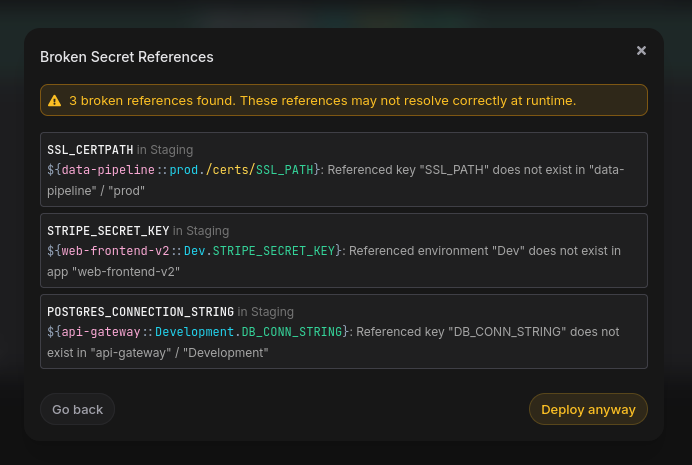
Available in Console v2.66.0.
Email + Password Sign-In
You can now sign up to Phase with just an email and a password — no SSO provider required. It's the simplest path to getting started: enter an email, verify it, set a password, and you're in.
Password auth also gives admins a way to sign in and set up other forms of authentication — like SSO — which can then be enforced for the rest of the team.
The login page now uses an email-first flow. Type your email, and Phase shows you the right sign-in option for your account — password, your organization's SSO provider, or both. Password changes are available from account settings any time, and the existing account recovery flow now resets your login password as well.
On Phase Cloud, password authentication is on by default. On self-hosted instances, it stays SSO-only after upgrade — set ENABLE_PASSWORD_AUTH=true to enable email signups and password login for your team.
Check out the Password Authentication docs and the self-hosting environment variables for setup details.
Available in Console v2.67.0.
Self-Serve OIDC SSO
Organization owners and admins can now configure SSO directly from the Console, in just a few minutes. Microsoft Entra ID and Okta are supported at launch, with more providers planned.
The setup flow:
- Open Access → Single Sign-On in your org settings
- Add a provider with the details from your identity provider
- Test the login end-to-end from the Console before activating
- Optionally enforce SSO so all members must sign in through it
When SSO is enforced, members are guided straight to the configured provider on their next sign-in attempt. If they land in the org without an active SSO session, they're shown a dedicated "Sign in with <provider>" card with a one-click restart — no dead ends.
We've built in safeguards too. Deactivating the last enabled provider automatically turns enforcement off, and self-hosted deployments have an SSO enforcement recovery command for the rare case of a provider outage or admin lockout — so you always have a path back in.
Check out the Single Sign-On docs for a setup walkthrough with screenshots, and the OIDC SSO reference for provider-specific configuration.
Available in Console v2.67.0.
Auth Improvements
We've invested in a full rewrite of the the authentication layer that powers every sign-in to Phase — making it faster and more consistent across all of our supported identity providers, including Google, GitHub, GitLab, Microsoft Entra ID, Okta, JumpCloud, Authentik, Authelia, and GitHub Enterprise. This work is what made self-serve organization SSO possible, and lays the foundation for the deeper authentication and access controls coming in the next few months.
Available in Console v2.67.0.
Other improvements and fixes
- Polish on the new SSO experience — Refinements to first-time Entra ID logins and the new
/loginand/signuppages. Available in Console v2.67.1 - Direct Windows
.exedownload — The CLI install docs now offer a direct.exedownload for Windows alongside the existing Scoop install path — easier for users without a package manager configured - Routine security patches — Ongoing maintenance of our dependency tree across the Console backend and frontend
All features are live on Phase Cloud and available in the latest releases for self-hosted users.
As always, we'd love your feedback — come say hi on Slack or GitHub.